Notes: Stuff for Nerds

I teach people to use AI through work I've done myself.

If I were running a camp, here is what I would do with AI this week. A photographic newsletter for camp directors in the middle of family enrollment and staff recruitment. Three practical starting points for learning AI through work you already need to finish, with setup resources and a downloadable issue.

Read AI for Camps Weekly

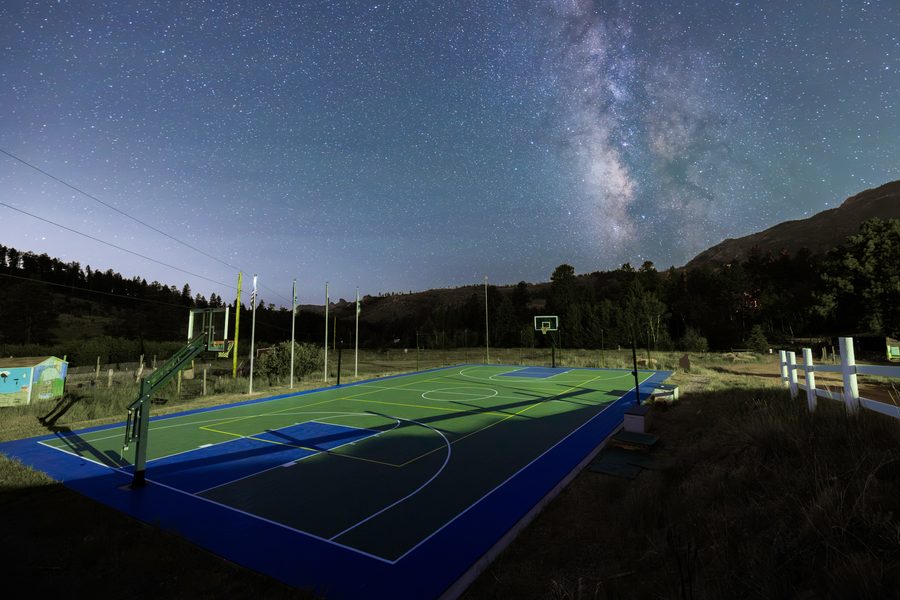
The Milky Way over the basketball court at Ramah in the Rockies, photographed by Noah Gallagher
Abba Photo: Ramah in the Rockies, Colorado.

Abba Photo and delivery pages

I built the business side of Abba Photo with AI: the website, the client pages, the operation around the photographs. It's a pretty good website, if I do say so.

One of the most useful things I've found with AI is putting information together visually, for myself and for clients.

Visit Abba Photo
Read the Abba Photo backstory

At Abba Photo, I make commissioned fine art. The images are designed for graphics, fine art prints, albums, marketing, and development collateral. How I deliver them matters: I want clients to see the possibilities for their work.

I needed a delivery platform that fit that service. I couldn't find an app that did what I wanted, so I said, "Make me a page with these things."

The page can include the photographs, a field guide, a media team guide, a way to see a photograph on a wall, and a way to make a slideshow. Those choices let someone engage with the work and consider how they want to use it.

The same idea can serve other work: a proposal a prospective client can explore, a dashboard for an event, or a page that gives an interviewer and the person being interviewed the information each needs.

Start with what you want someone to see and do. Then build a page around it.
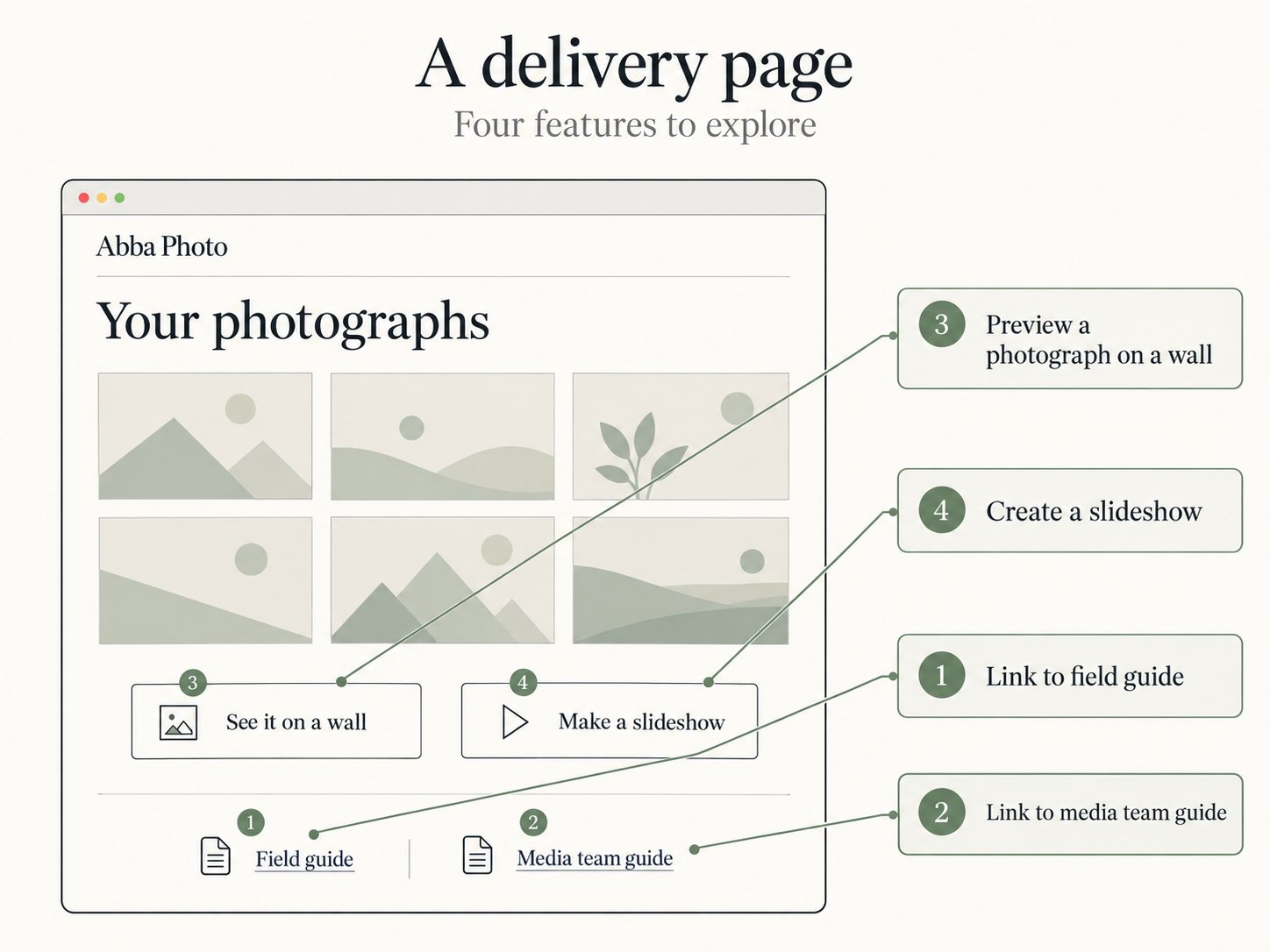
Delivery-page concept with field guide and media team guide links, a wall preview, and slideshow creation
Delivery-page concept. This diagram labels the four features.

Idaville: the prior-art skill

As a camp director, whenever I started a program, an off-season event, or a mini camp, I asked: Who did this before? Who did it well? Who did it poorly?

I wanted my agent to do the same thorough search across different sources, including the ones behind a login.

  1. Interview. Five questions aim the search.
  2. Search. Quick, thorough, or with logins.
  3. Report. A verdict, who to talk to, and what it could not reach.
Read the Idaville backstory

My daughters and I are reading Encyclopedia Brown. Before building a map of Idaville, we searched for earlier attempts and found exactly one reference to a map made for a classroom project in 2022.

That prior-art skill is free to download, so you can use it before you start something of your own. Read it first if you like.

In March I was typing prompts into video generation models to make 3D walkthroughs of my photographs. Neat, and not something I would show a client.

In September I gave the same request to an agent that had been running my business with me for five months, with two instructions that mattered: do not touch the photograph, and find the least expensive path. It found and installed Blender, free 3D software, and wrote the code. Every frame of this film is a view of my own pixels. The render costs nothing.

What is in the kit

The instructions an agent needs, the scripts, my scene file and the room. You don't run it. Hand the folder to Claude Code or Codex with one photograph and say: make the film. It needs Blender, which is free, and a small depth model, which is free. Twenty minutes later you have 22 seconds.

The photograph is from Ramah in the Rockies, Colorado, June 2026.

The map from the Acadia family page, with trip stops on Schoodic Peninsula and Mount Desert Island

Acadia

I was taking my three kids camping in Acadia. I started by asking AI for an itinerary, then kept asking for the things that would make it ours: a map, photographs, packing jobs, games for the drive, and a way for the kids to ask me for something.

Explore the Acadia page
Read the Acadia backstory

That became a little website. There was a podcast about Acadia's geographic features, a trivia game, and road bingo. One of my daughters was determined to see a dolphin, so the map got a few "fin watch" spots. Dolphins had not confirmed attendance.

I wanted the kids to get excited and take part in the trip. They engaged with each other more than they buried themselves in music or a device.

I wanted a way to check a strategy, a client email, or a web page without asking the same assistant to approve its own draft.

So I asked: how do I get a verification engine?

I send drafts to AI models from other companies. Each reads alone and gets the facts it should check against. Then I check the findings myself.

On September 27, two models made four reads of a draft of my notes page for about 13 cents. One caught a table that wouldn't fit on a phone. All four flagged a link that didn't belong.

Three also reported a title problem. The actual page was fine. The problem came from the flattened copy I'd given them.

Try it on your next important draft. Give a different company's assistant the draft and its source facts. Ask: "Which sentences are not supported by these facts?"

Then check what it found.

The video ad

I wanted a clever way to show an onboarding process I'd created. I made this video. I've since abandoned the process.

I didn't spend a significant amount of time or energy on production. I didn't drag clips or manually edit a single part. I gave the narration, a basic concept, and small tweaks when it needed them. This was the third variation, and it looks exactly like I wanted it to look.

I showed it to my three children. They had nothing good to say. My son, the last to see it, said, "No, no, Abba, you can't do that." In this case, my children were the human verification engine: they were better at identifying a failed concept than AI and my wife.

I'm sharing my failed attempt for your viewing pleasure.

My first coding project

My first coding project was a trading engine for prediction markets. It connected directly to Kalshi, kept a live order book, and sent orders when my trigger fired.

I spent a lot of time on the connection and the order path: keeping a connection warm, preparing authentication, reading live market messages, and checking the spread before sending an order. Later code checked order status and tried to reconcile uncertain responses instead of assuming an order had failed.

Later versions used PyKalshi for some data access while keeping my own execution path, position controls, and replay tests. I built those tests to look for an edge I could use.

The Bitcoin contracts I tested settled on an average of sixty one-second reference prices in the final minute. Responding quickly to a price move was not the same thing as predicting that settlement price.

Speed did not become a trading edge. Finding a meaningful one proved difficult, nay impossible.

I kept the code and the testing documents. I'm keeping the failure in the story, too. The GitHub link is for PyKalshi, the Python client I used.

What are you trying to do?

Bring one real thing from your work or life. I offer a free 20-minute conversation to find a useful starting point.

Book a 20-minute talk